This quarter was about payroll that fits how people actually get paid. Caregivers paid per visit, workers with more than one court order, employers adding new savings and retirement options, and operations teams who need answers fast. Here are some of features shipped between July and September 2026.
Launching your own payroll product shouldn't mean rebuilding payroll. Salsa does the heavy lifting on every run: the calculations, the legal limits, the rule changes. And most of what we deliver as a screen is also in the API, so the same building blocks are there whether your employers use our embedded components, you build your own UI, or an agent does the work. Each update below says where it shows up in the product and, where there is one, the API behind it.
A revamped garnishments experience
We revamped how US garnishments work in the Salsa Dashboard and the embedded employer and worker profiles. Each garnishment is a legal order with its own amount and its own limit, and a worker can have more than one at a time. That's why Salsa treats garnishments as a payroll element of their own. A garnishment isn't a deduction under another name: it's calculated from disposable earnings, limited by law and ranked against the worker's other orders.
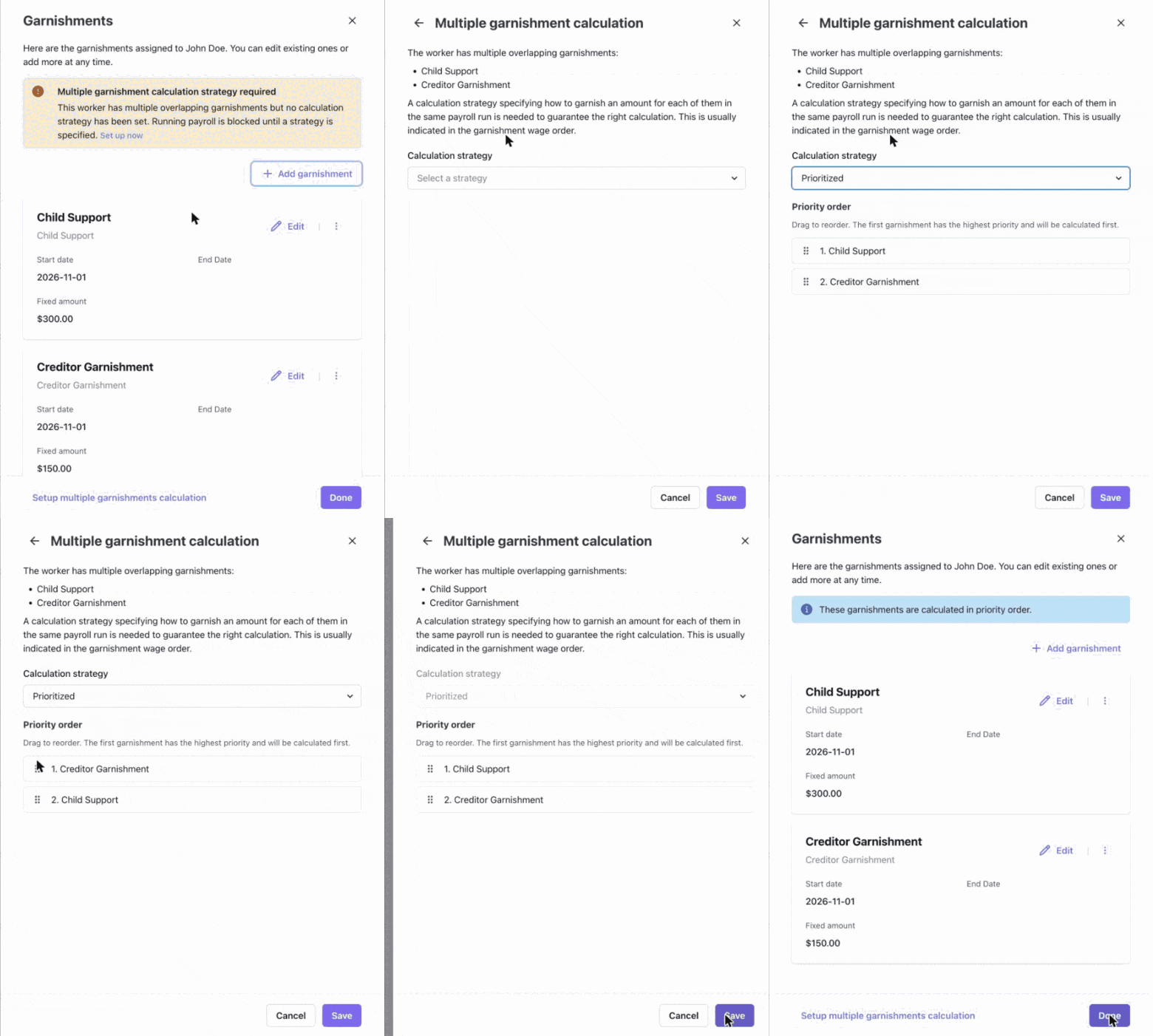
You can see that in the product. Garnishments have their own card, where a worker can carry several orders at once, of different types: child support, creditor garnishments, federal tax levies and Other for anything else. Each order keeps its court details, like the case ID exactly as it appears on the order. Your team uses the card in the Salsa Dashboard, and employers use the same card inside your product.
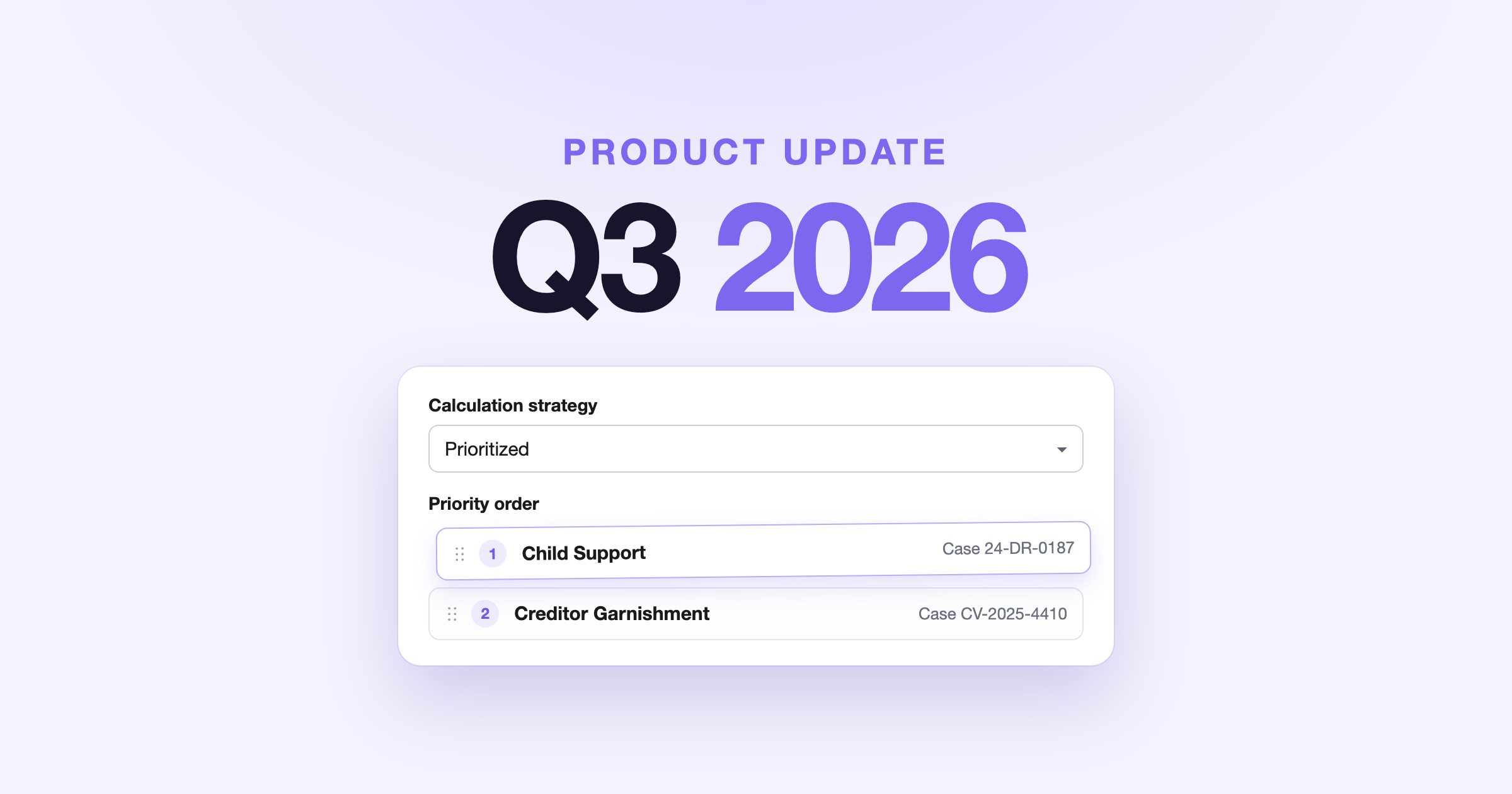
Ranking matters once two orders apply to the same paycheck. The orders themselves or state law usually decide how they're paid: one after another, typically child support first, or split between them. So when a worker's orders overlap, the card flags it and payroll waits until you set the Calculation strategy the orders call for: Prioritized, dragging them into the sequence Salsa withholds them in, or Prorated, splitting the available amount proportionally. When a worker has a federal tax levy, only Prioritized is offered.
Salsa then applies the strategy on every run. With hourly pay, disposable earnings change every period, so the amounts are worked out again each time.
Getting that model right is what you build on. The same foundation serves small employers and large ones, whether they use our embedded components, your own UI on the API, or an agent, and it saves you from reworking garnishments later.
Piece rate pay: pay per visit, per item, per delivery
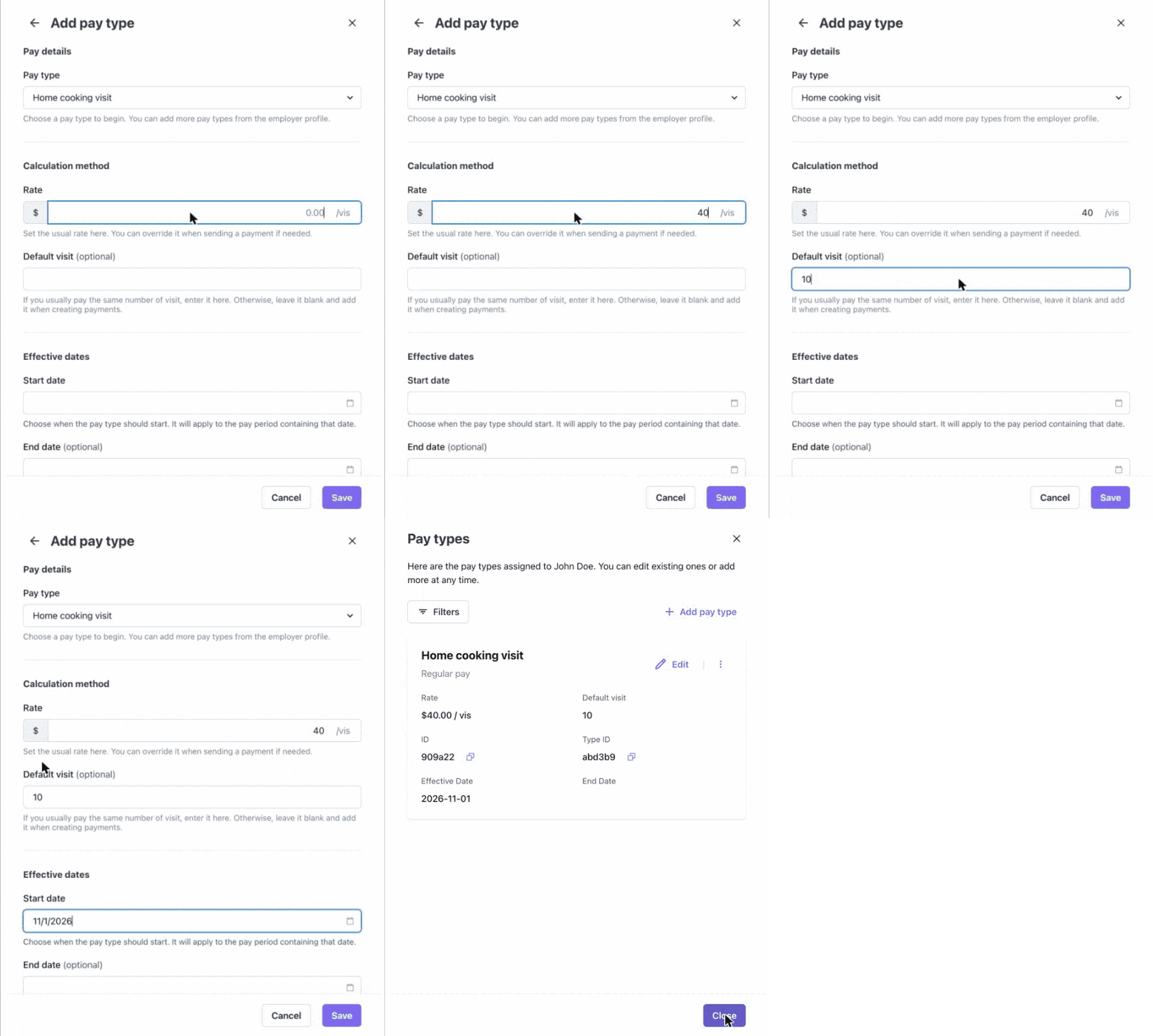
Rate-based pay types can now use an Items unit alongside Hours, so workers can be paid per visit, per class or per item. You control how each piece rate is named and shown, so it matches your platform and what your customers expect.
Each Items pay type carries its own label and abbreviation, in the employer's words: "Visit / vis" for a home care agency, "Class / cls" for a fitness studio, "Delivery / del" for a courier, "Job / job" for an auto repair shop. You can offer specific pay types with your own labels, or a general Items pay type that your employers label themselves.
Where the counts come from is your call. If your product already tracks them, send them through PayStream in the items field, along with hours worked so overtime comes out right. You can make the counts read-only in the Run Payroll grid so they aren't changed in two places.
If it doesn't, employers enter counts in the embedded Run Payroll experience and your team can enter them in the Salsa Dashboard: in the grid, in spreadsheet mode or in the entry drawer. Workers see the count and the rate in a new Items column on their earnings statement.
A pay type can be a fixed amount, an hourly rate or a piece rate, and all three can run in the same payroll. When a home care caregiver completes 10 visits at $40, Salsa calculates the $400, shows the 10 visits on the statement and includes the visit pay in the regular rate it uses for overtime. To go deeper, see how to set up employer pay types.
Plenty of work isn't paid by the hour: home care is paid per visit, fitness per class, deliveries per drop. When those counts are rolled into a flat amount before payroll, the context behind the pay is lost, and under the FLSA, piece-rate earnings still count toward the regular rate for overtime. Items pay types carry that context from your product into payroll: a run shows "10 visits" at "$40.00 / vis" instead of a bare $400. Whoever reviews the run, a person or an agent, sees the same visits that are on the schedule, with nothing to translate, and workers can match their pay to the visits they made. Payroll then feels like part of your product, rather than something bolted onto it.
Clearer multi-rate pay in Run Payroll
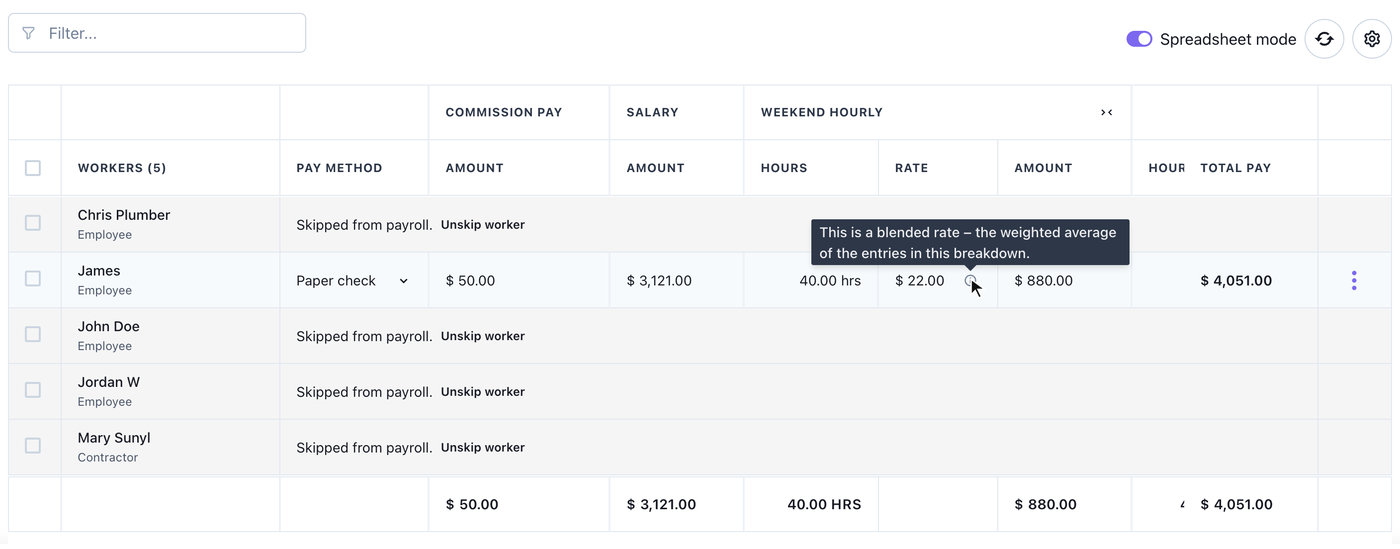
When a worker's pay for the period comes from more than one rate, Run Payroll now says so. The rate is marked as a blended rate, and an info icon explains that it's the weighted average of the entries behind it.
Employers see it in the embedded Run Payroll experience, and your team sees it in the Salsa Dashboard. In spreadsheet mode, an overridden value can also be reset to the original in one click, with a confirmation first, and developers can do the same with canBeReset and clearOverrides.
A blended rate is easy to mistake for a typo. A caregiver who works 30 hours at $20 and 10 night hours at $28 earns $880, which averages $22 an hour across the 40, and an employer who corrects that $22 back to $20 has just taken $80 out of the paycheck. Marking the rate as blended, and pointing corrections to the hours behind it rather than the average, keeps a well-meant edit from turning into an underpayment. For your payroll program, that means fewer corrections to untangle after the fact, and employers who can trust a run even when shifts pay different rates.
Cancel an employer from the Salsa Dashboard
Employer cancellation is now built into the Salsa Dashboard, so your team can offer it without building an integration.
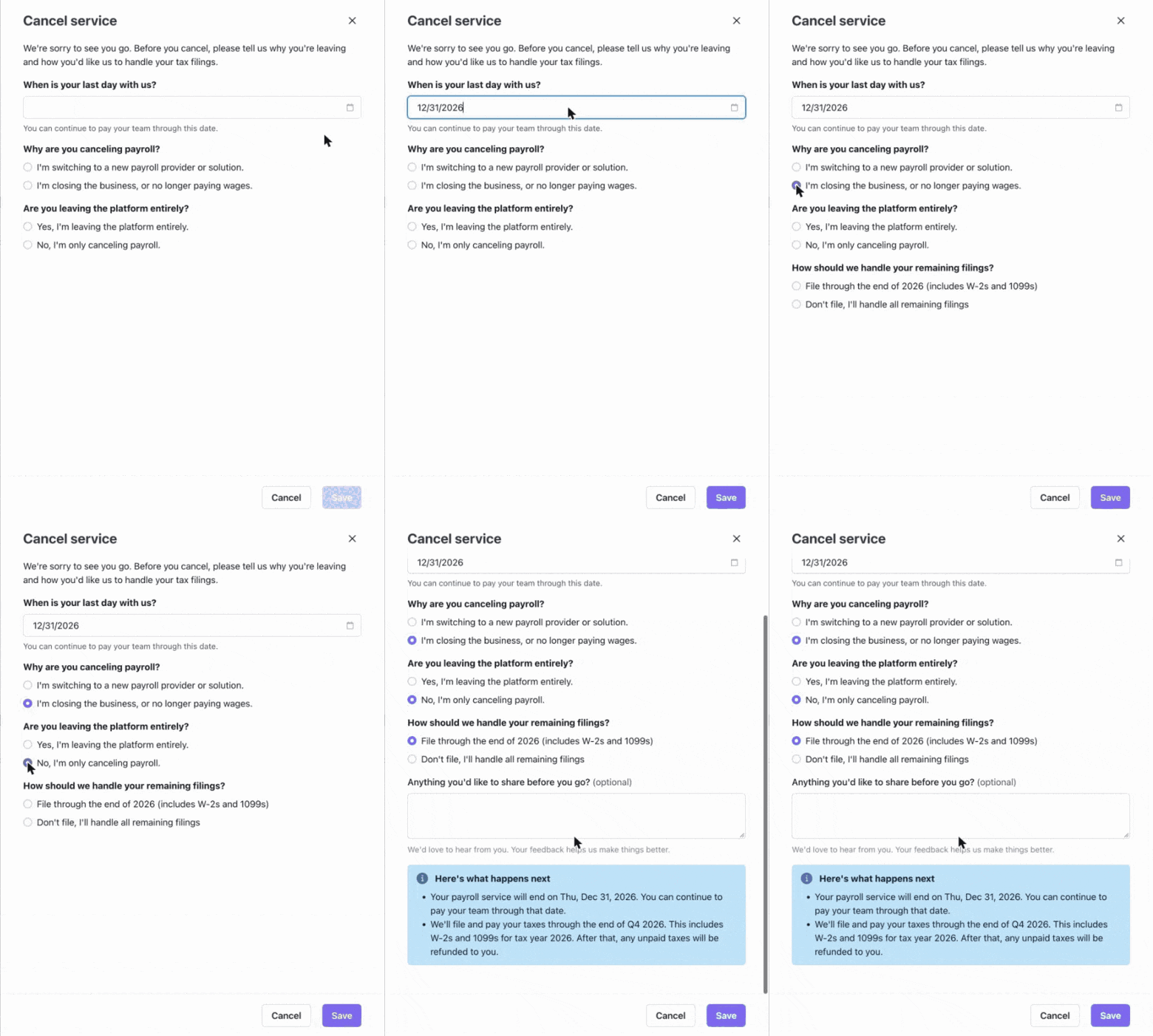
From the employer's page, partner users open Actions → Cancel service, pick the reason and the date, and decide who handles the remaining tax filings. Only your team can cancel an employer; employers don't have this option in the embedded components.
If you'd rather run cancellations from your own tools, the same flow is in the GraphQL API (createCancellationRequest), with optional fields for the stated reasons, the destination provider and whether the employer is leaving your platform entirely. The employer cancellation guide walks through the full flow.
Ending payroll with a provider isn't just switching something off. Quarterly returns and year-end forms like W-2s and 1099s still need an owner, and when a business closes, some of those deadlines come sooner. That's why the reason matters: if Salsa keeps the filings, responsibility runs through the end of the quarter for a switch, and through the end of the filing year for a closure, W-2s and 1099s included. A clean exit is often the last impression an employer takes with them.
Compliance update: Trump Accounts and 401(k) catch-up rules
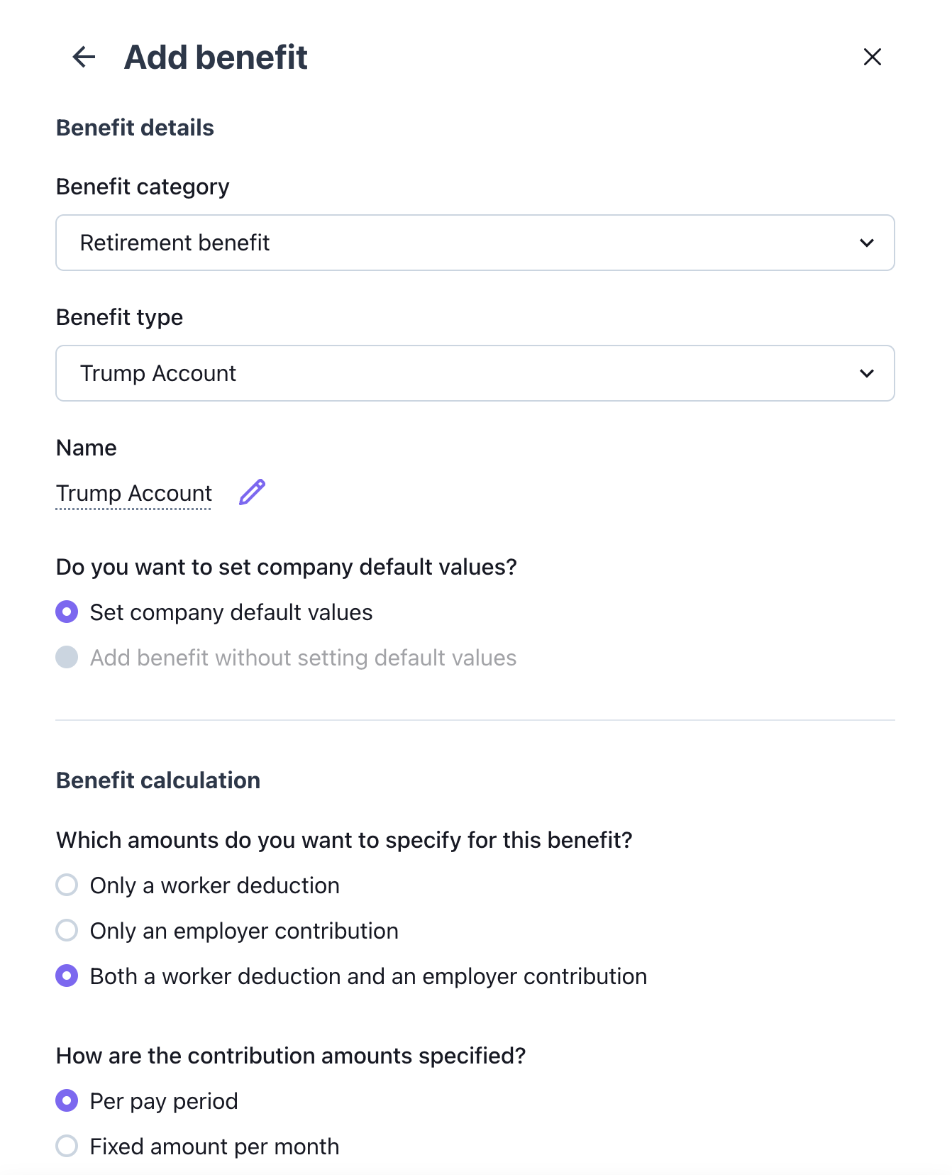
Salsa now has a Trump Account benefit type, turned on automatically for US employers, and supports the new 401(k) catch-up rules: super catch-up for workers aged 60 to 63, and Roth catch-up for higher earners.
Employers add Trump Account contributions like any other benefit, in the Benefits card in the Salsa Dashboard or your embedded employer profile, for employer contributions, employee contributions to a dependent's account, or both. Salsa tracks the annual limits, applies the state tax treatment and reports contributions on the W-2 in Box 12 with Code TA.
For retirement plans, Salsa supports super catch-up for 401(k), Roth 401(k) and SIMPLE IRA plans, and the Roth catch-up rule for the 401(k) workers it applies to. Employers choose the catch-up settings their plan supports, including Roth treatment for the higher earners the new rule covers.
The One Big Beautiful Bill Act (OBBBA) created Trump Accounts, savings accounts for children that employers can contribute to through payroll. Catch-up rules changed too: from 2026, workers whose prior-year FICA wages from the employer were above the IRS threshold have to make catch-up contributions as Roth, while SIMPLE IRAs aren't covered by that rule. We track rule changes like this and build them into payroll, so you don't have to, and nothing changes in your integration.
Everyday efficiency in the Salsa Dashboard
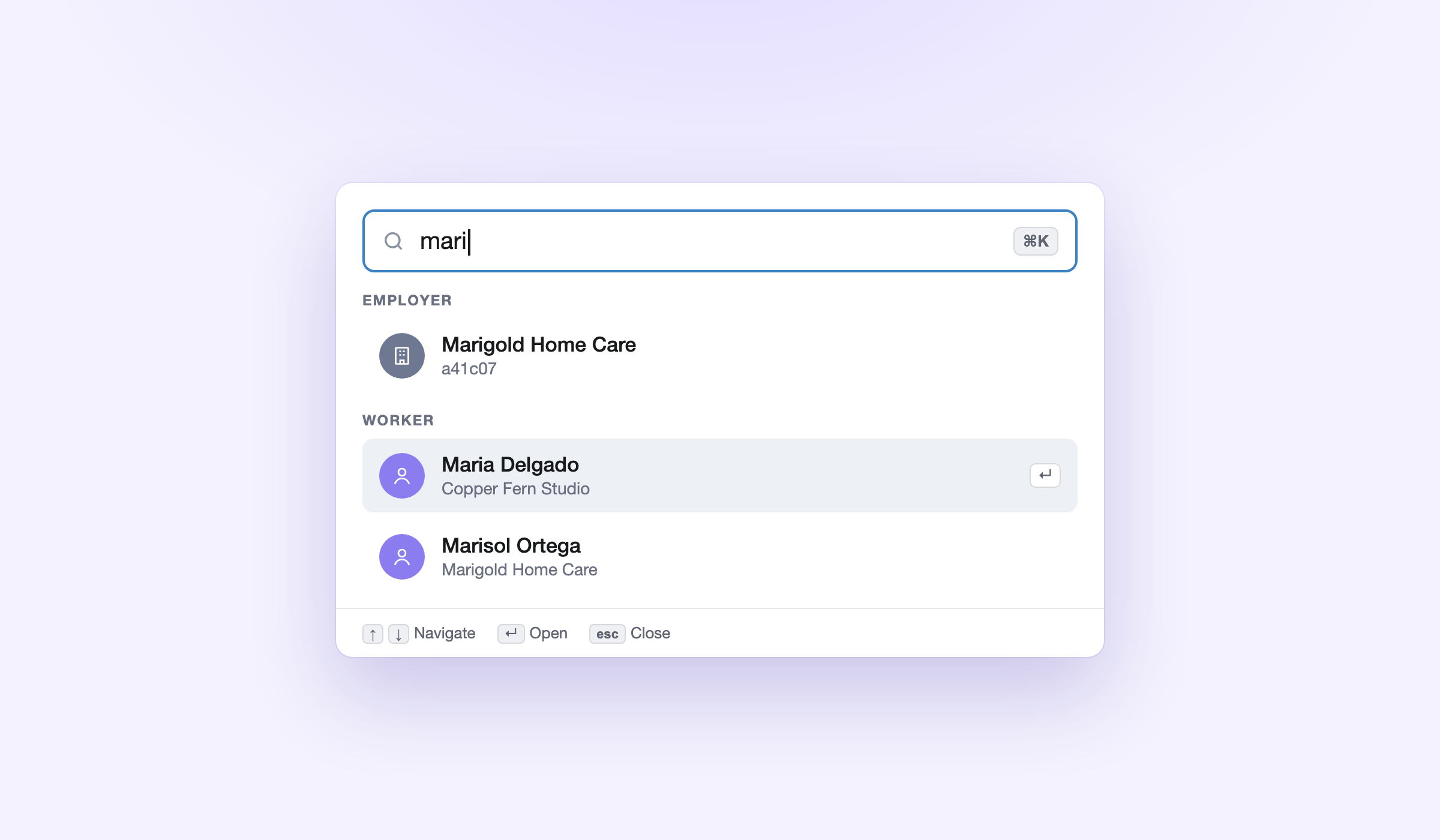
Partner users can now jump to any employer or worker with global search in the Salsa Dashboard, alongside a set of everyday improvements that cut the steps between a question and an answer:
- Global search (Cmd/Ctrl+K) to jump to any employer or worker by name, with recent employers shown first
- Browser tabs named after the employer or worker you're on, and a breadcrumb on worker profiles
- Federal and state or provincial jurisdictions shown by default, with local ones a click away, plus a jurisdiction codes column in the worker list
- Several workers at once in any report with a worker filter, and the first payroll's pay date on Employer Overview
A support lead with ten tabs open can find the right employer by name, open the worker from search and pull one report for the three workers in question. Developers can pass workerIds to the Worker Details report too. Most support questions start with finding the right employer and the right worker, and that should take seconds.
Also new this quarter
- Workers with no pay skipped automatically. The embedded Run Payroll flow now leaves out workers with no pay data, with a notice on the next step, so no $0 entries end up in their payslip history.
Document.deletedwebhook. Your platform hears about it whenever an employer or worker document is deleted, for any reason, so your product never points to a file that's no longer there. The webhook reference has the payload.
Get started
Most of this is on for every partner. Garnishments, Trump Accounts and the 401(k) catch-up options apply to US employers. To add Items pay types for piece rate pay, talk to your Salsa team and we'll set them up with you.
We're building payroll infrastructure that keeps up with how your customers pay their people, from the first payroll to the last. To learn more, explore the docs or reach out to our team.
Stay in the know
Sign up to receive regular product updates highlighting our feature announcements and product enhancements.