This quarter's updates focus on the first weeks of an employer's life on your platform, the stretch that sets the tone for everything after. A lot of the work went into those weeks, from choosing a pay schedule that actually works to bringing payroll history over from a previous provider. Alongside that, we rebuilt deductions, added an embeddable reports component, let employers choose which bank account funds each run, made it easier to give the right people access to sensitive data, and let you put your own identity check in front of it. We also kept up with the new federal rules on tips, which needed nothing from your integration.
Every payroll product makes its own call on who does the work. Some partners offer payroll as a managed, concierge-style service, with their customer success team running it in the Salsa Dashboard; others make it self-service, in the employer's hands inside their own product. We build for both, so each update below says where it shows up: for your team, for employers, or both.
Revamped UX for pay groups
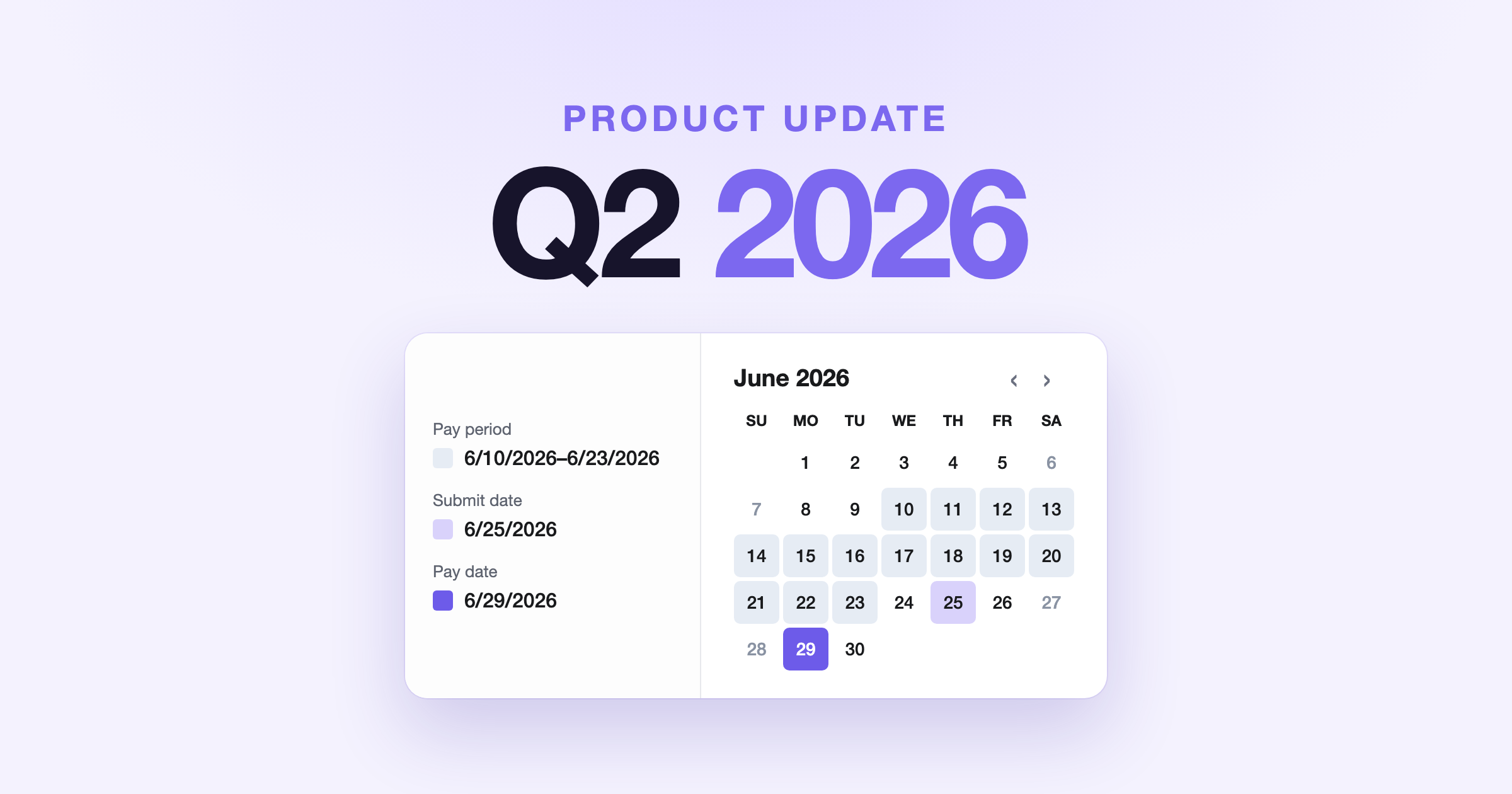
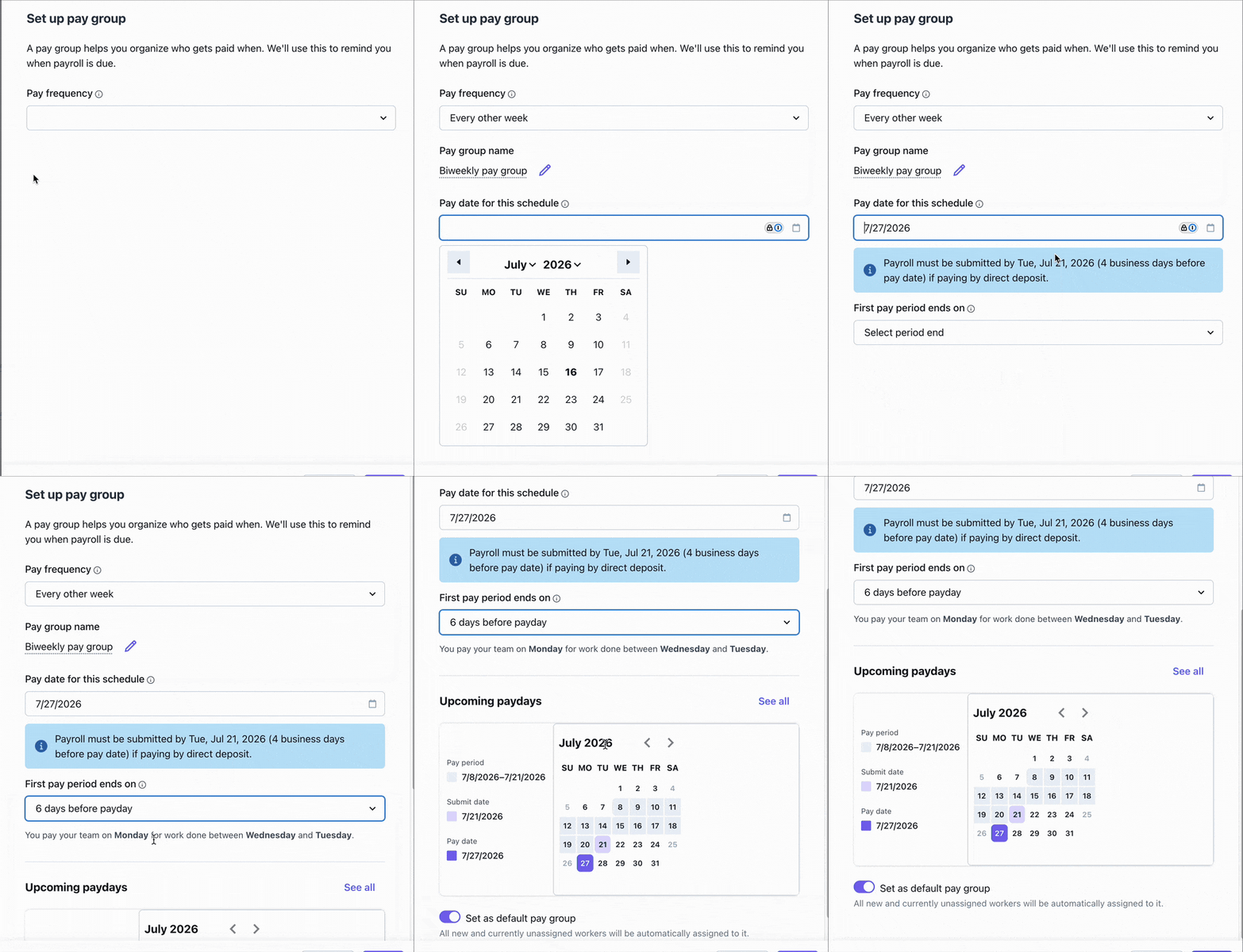
We revamped pay group setup in the embedded Employer Onboarding and Employer Profile components. For weekly and biweekly schedules, employers now see the pay period, the submission deadline and the pay date together on a calendar before anything is saved, and the form warns in real time when a choice leaves too little time.
Employers start from Add pay group, during onboarding or later from their profile. Period-end options already account for payment lead time, and the Upcoming paydays calendar updates with each choice, showing the pay period, submit date and pay date for the next runs. When a choice won't work, the form says so in plain words, for example:
Workers will be paid before the pay period ends. Most states require workers to complete the work before receiving payment.
Once payroll is running, the submission deadline stays visible in the payroll launcher. It's available out of the box, with no integration work.
Picking a pay schedule looks simple until the first payday. With direct deposit, payroll usually has to be submitted and funded a couple of banking days before payday, so a period that ends too close to payday leaves little time to collect hours and get payroll ready. Making that timing visible up front helps an employer's first payroll land on time.
A revamped employer migration experience
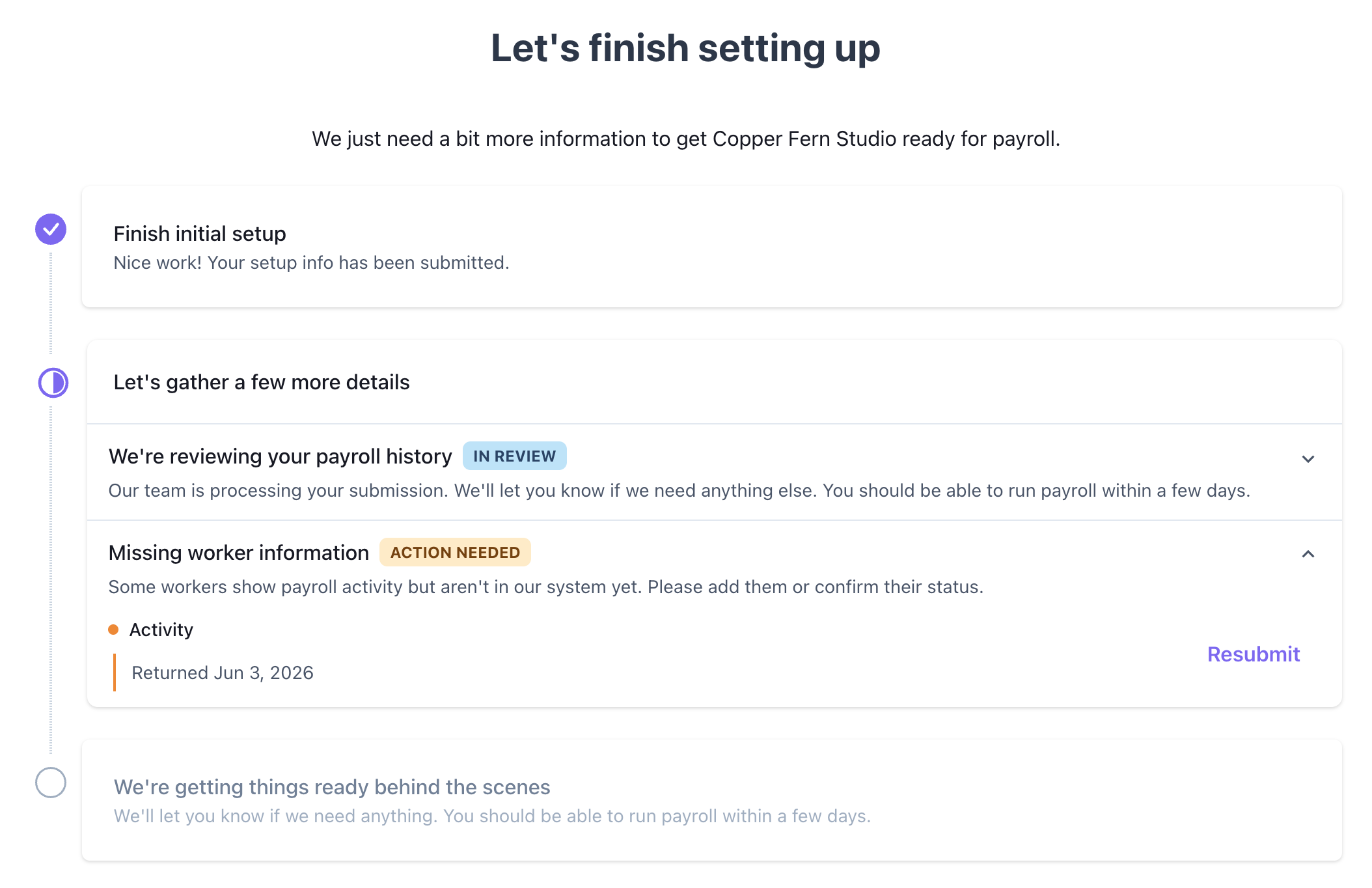
Employers moving to your platform from another provider now see a migration tracker on the embedded Employer Dashboard, right where they land when they log in. It follows their payroll history import from start to finish, from pending, to in review with an activity timeline, to complete.
When something needs their attention, each reason gets its own card with the next step, like resubmitting or uploading a file, and the card goes away once the migration is complete. Your team sees the same status, and the Employer.PayrollHistory.statusChanged webhook lets your platform react to every change, whether that's a reminder email or an update to your own onboarding checklist.
Plenty of employers switch providers in the middle of the year, and switching doesn't reset the year. Wages already paid still count toward the Social Security and unemployment wage bases, taxes already withheld still matter, and all of it belongs on the W-2 in January. Getting that history in, and getting it right, is one of the most important parts of onboarding. Showing employers exactly where it stands, and what's needed next, builds their confidence and keeps them moving toward their first payroll, which is how more of the employers who start onboarding with you become active payroll customers. To dive deeper, check out Track and engage employers through activation.
New embeddable component: Employer reports
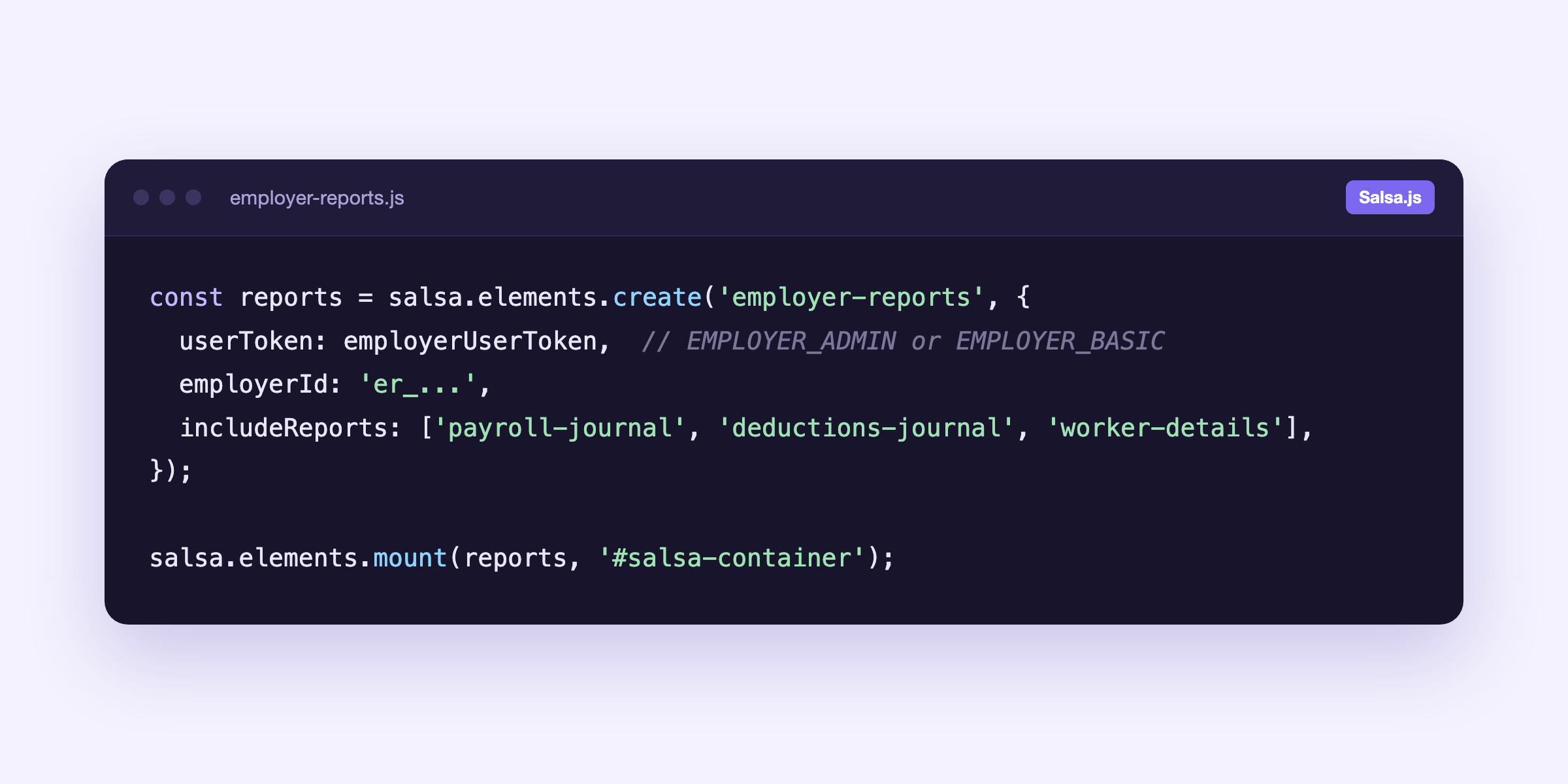
We've made a new embeddable component available, Employer reports. You integrate it with Salsa.js like our other embedded components, and it's scoped to employers, so employer admins and basic users see their own company's reports.
It brings the Payroll Journal, Worker Details and the Benefits, Deductions, Garnishments and Time Off journals into your product. Each report is a card that opens with its own date range and filters, and you choose which reports appear. Embedding it takes a few lines of Salsa.js.
Payroll doesn't end when workers get paid. Someone still has to book the run in the general ledger, reconcile benefit deductions against the carrier's invoice and keep track of what was withheld for each garnishment order, and those jobs run on reports. This lets you give employers the payroll reports they use most, inside the product they already use every day, without investing product resources in report screens of your own. Check out the documentation: Employer reports experience
Revamping our deductions
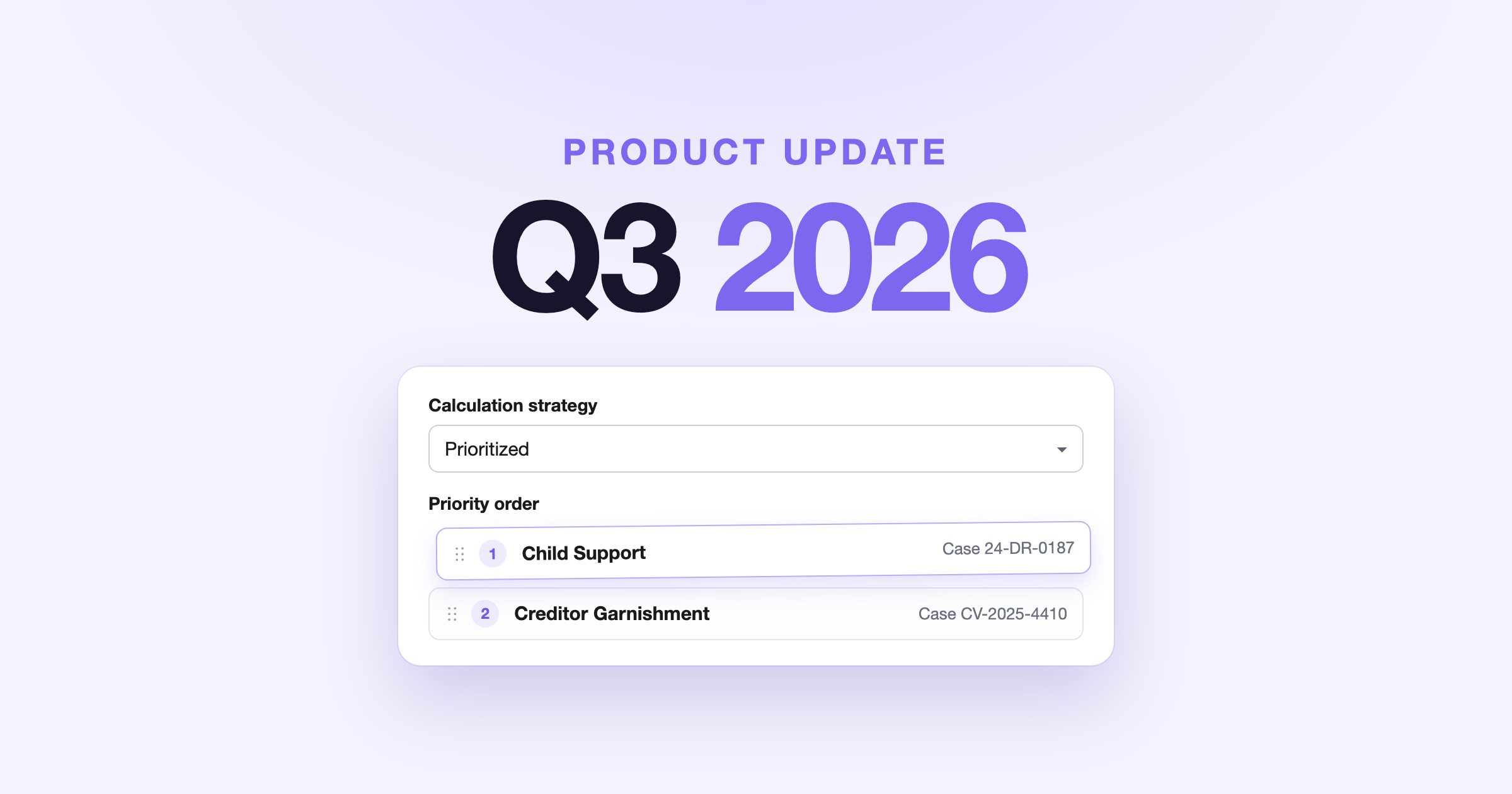
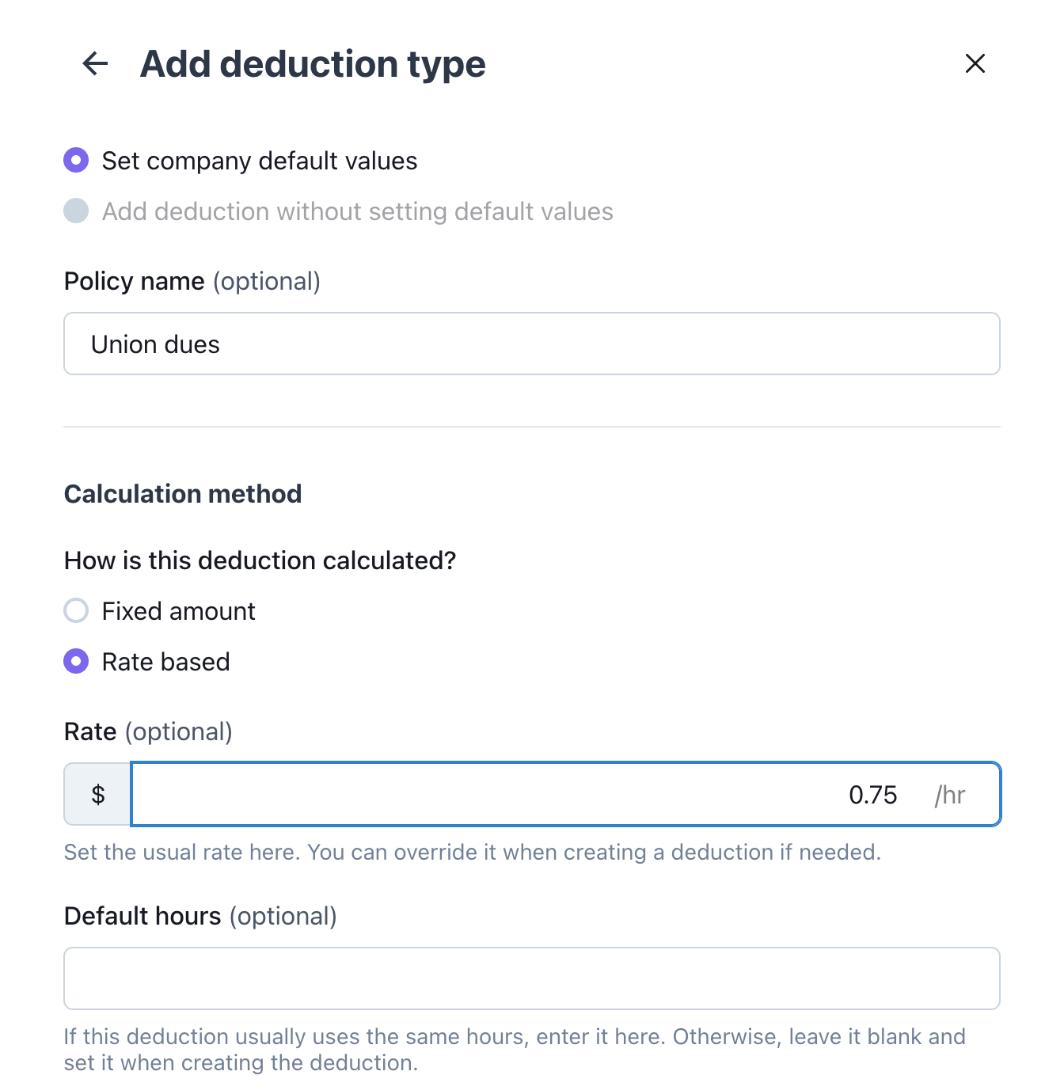
We revamped deductions to follow the same pattern as the rest of our payroll elements, like pay types, benefits and time off, and made them more flexible. Alongside a fixed amount or a percentage of gross, a deduction can now be rate-based: a rate times the hours worked.
You'll find it in the new Deductions card, in the Salsa Dashboard and in your embedded employer and worker profiles. On the employer profile, Add deduction type sets the name, how it's calculated, effective dates and an optional annual cap. Then you assign workers one at a time from their profile, or all at once with Assign workers. Union dues of $0.75 an hour, for example, come to $60 on an 80-hour period and $54 on a 72-hour one, with nobody recalculating. For developers, a deduction type and its policy can now be created in one call and assigned in bulk through the API, and the existing deduction mutations keep working.
Deductions don't all work the same way. Parking might be the same amount every paycheck, while union dues are often charged by the hour, so the amount moves with the schedule. Turn that into one flat number each period and the worker sees a deduction that changes for no visible reason. With rate-based deductions, the rate and hours stay with the deduction on the worker's payslip record, so the amount always has an explanation.
Choose which bank account funds each payroll run
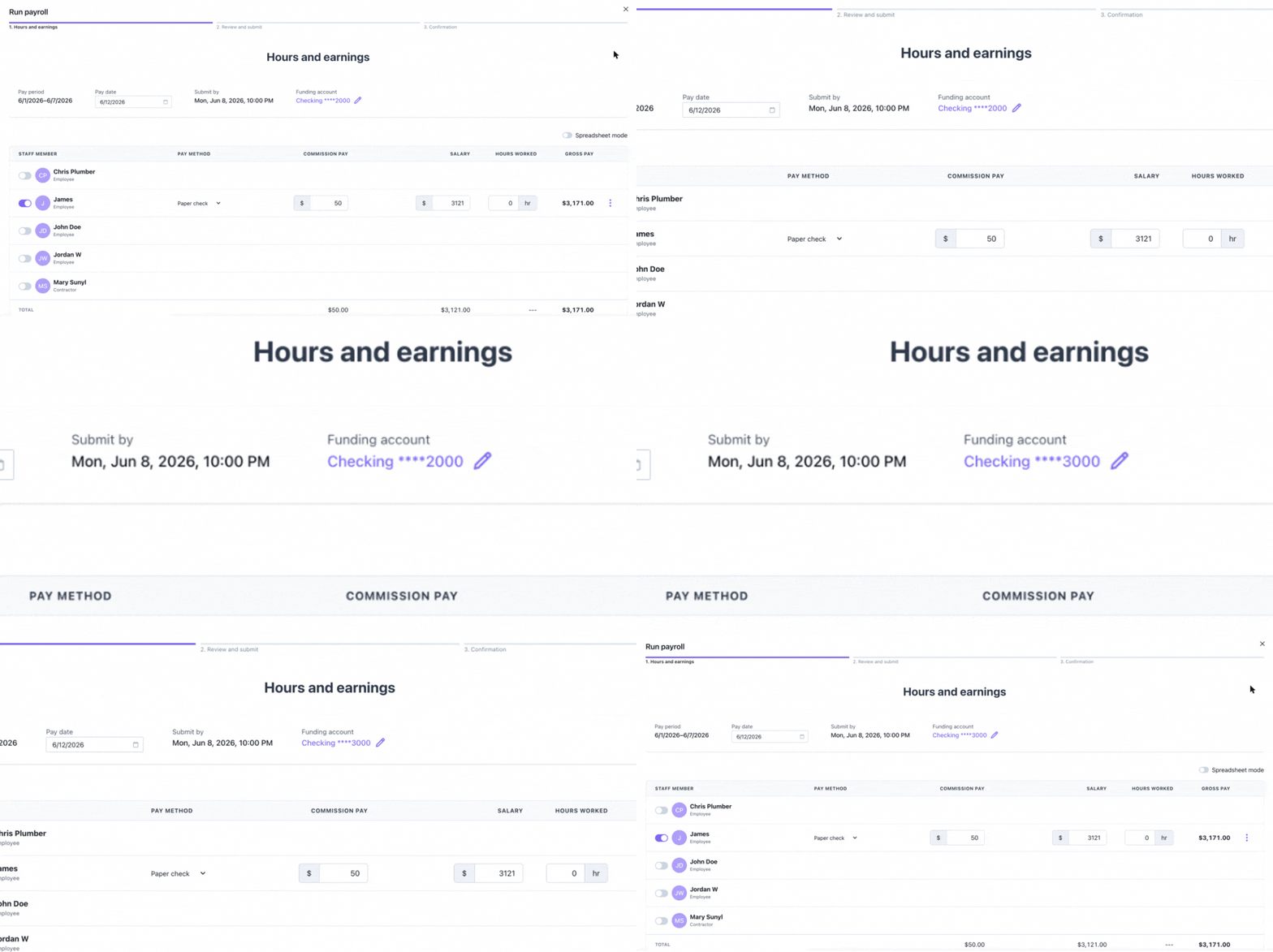
Employers with more than one verified bank account can now pick which account funds each payroll run, or set a default for each pay group.
In Run Payroll, the Funding account at the top of the run lists the employer's verified accounts, so the account can be switched before the run is submitted. Each pay group also has a Default funding account, set from Edit funding account in the pay group's menu, so a location's payroll comes out of that location's account without anyone having to remember. When nothing is chosen, the employer's default account is used. It's available to employers in the embedded Run Payroll experience and to your team in the Salsa Dashboard, and developers can use updatePayrollRunFundingBankAccount for a run and defaultFundingBankAccountId on pay groups.
Plenty of employers keep more than one account: a dedicated payroll account kept apart from operating cash, or one per location. Payroll has to come out of the right one, and it has to be verified, because that's where the debit lands. Salsa checks the account is still verified before the money moves.
Enabling access to sensitive data for the people who need it
The Salsa Dashboard now has two roles, so you can give access to full sensitive data to the people who need it. Operator is the default and works with masked data. Super Admins can also view full employer and worker bank account numbers and worker government IDs. Your Salsa team sets up Super Admins with you.
Super Admins see the full numbers right on the employer and worker profiles, can turn on Include government identifiers when they export the Worker Details report, and manage bank accounts and payment authorizations. Our recommendation is to make your team leads Super Admins and keep support specialists on Operator: specialists handle most questions with masked data, and when a case needs the full number, a lead steps in. Inside your product, the same model applies. Employer super-admins can view full employer and worker bank account numbers and worker government IDs, and worker super-admins can view their own. You decide who gets which role, and every reveal is logged.
Ask anyone who has chased a missing direct deposit: the last four digits of an account number often aren't enough to spot a mistyped digit, and benefits census files and some tax notices need the full government ID. Access stays least-privilege, and the people who need it get it in a click. Check the documentation: Authorization and roles
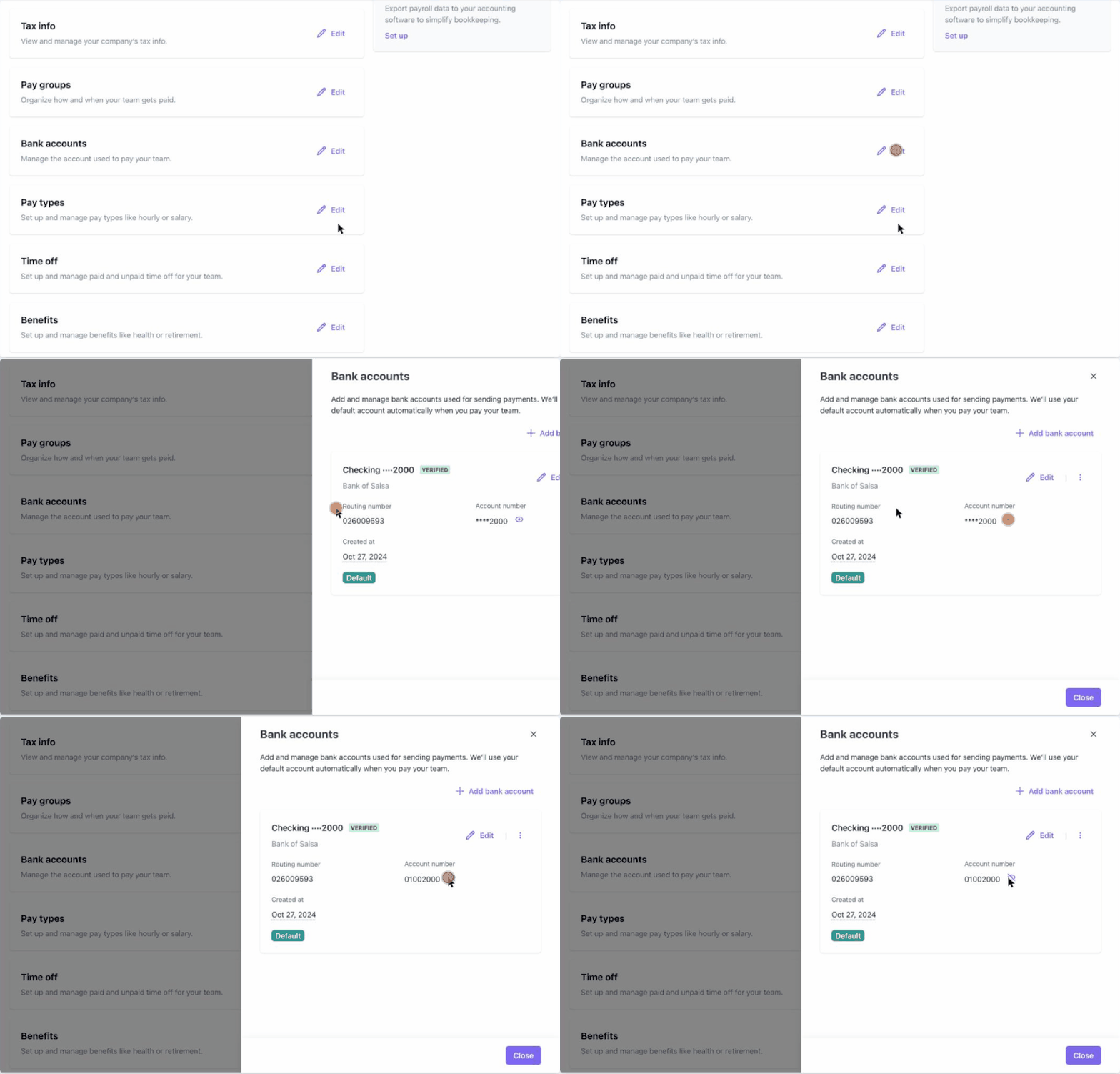
Use your own identity check before sensitive actions
Salsa's embedded components can now hand off to your own 2FA or MFA right before a sensitive action, so the person revealing a full bank account number or a worker's government ID has just proven it's them.
When an employer admin clicks to reveal an account number in your product, Salsa shows a verification prompt and tells your app which action they're attempting. Your app runs the check your users already know, issues a short-lived token at the role that action needs, and the number appears. The same step works for adding a bank account, editing a government ID, downloading a document and exporting the Worker Details report with government IDs. You decide how long the higher access lasts; we recommend dropping it after 5 to 15 minutes. Developers turn it on with allowRequestForPrivilegedAccess on the element and handle the request-privileged-access event.
There's no separate identity system to build or maintain for payroll: Salsa calls the MFA you already run, so the investment you've made in sign-in security now protects payroll's most sensitive actions too.
Bank details and government IDs are what payroll fraud goes after: a take-over of someone's login is often followed by a quiet change to where the paycheck goes. Asking for proof at the moment of the action, not only at login, is the safer pattern, and because it's your verification flow, employers and workers verify the way they already do in your product, with no second login. For more context, check Protect sensitive actions with identity verification
W-2 reporting for tips
For the 2026 tax year, Salsa reports total cash tips on W-2s in Box 12 with Code TP, counted from January 1, following the One Big Beautiful Bill Act (OBBBA). Existing tip pay types map to Box 12 automatically, and a new Service charge pay type keeps mandatory service charges separate from tips.
For example, restaurants and salons that add mandatory charges record them under the Service charge pay type, and move any existing service-charge records over before W-2s are generated. Tips are still taxed in payroll as before, and nothing changes in your integration.
OBBBA lets eligible workers deduct up to $25,000 of qualified tips a year on their federal return, from 2025 through 2028, subject to income limits, and Box 12 is the starting point they use to figure it. The distinction that matters most is between tips and service charges. Under IRS rules, a mandatory charge, like an automatic 18% on large parties, is a service charge, and what's paid out to staff from it counts as regular wages, not tips. We track rule changes like this and build them into payroll, so you don't have to, and your team stays focused on the experience you give employers.
Also new this quarter
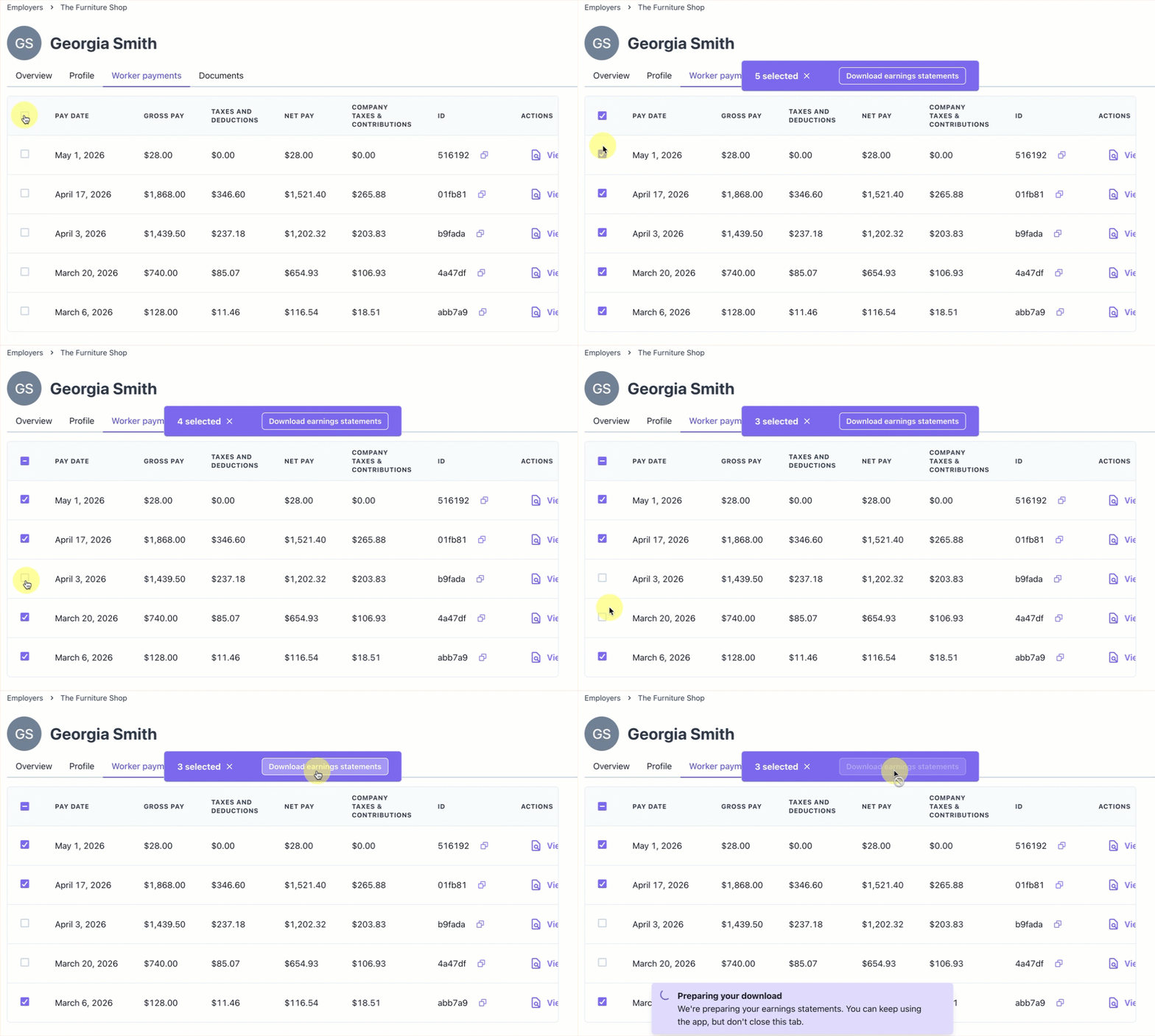
- Download earnings statements in bulk. On a completed payroll run, Download all earnings statements combines the run's statements into PDFs of up to 100 each. In a worker's payments list, you can select up to 100 payments and choose Download earnings statements. Both are available to your team in the Salsa Dashboard and to employers in the embedded payroll run and worker payment components, with nothing to set up. Handy when an employer asks for every paystub from a run.
- Payroll Journal per run includes linked adjustments. The Payroll Journal for a run can now pull in adjustments linked to that run, such as a later void, so the run's full story sits in one report for the employer's accountant. It applies wherever the run's journal comes from, the Download Payroll Journal report action in the payroll run list or the API.
Get started
Most of this is on for every partner today. To set up Super Admins, talk to your Salsa team. To bring employer reports, deductions or super-admin access into your product, add the element, card or role in your integration, and we'll help you plan it. Using your own identity check takes a small change: handle one event and swap the user's token.
We're building payroll infrastructure that adapts as your product and your customers grow, and that takes care of the payroll details so your team doesn't have to. To learn more, explore the docs or reach out to our team.
Stay in the know
Sign up to receive regular product updates highlighting our feature announcements and product enhancements.