An agent that checks payroll readiness every morning has to reach Salsa with nobody signed in. So does a workflow that drafts support replies. For that kind of access to Salsa's Model Context Protocol (MCP) server, we chose OAuth client credentials over API keys.
Why not an API key
An API key usually lives in your backend, next to the other secrets your engineers protect. MCP changes who holds the credential. The people who connect an MCP server often work in operations, support or finance, and they wire it into AI assistants, workflow builders like Gumloop and other agent platforms. Each is one more place a credential can end up in a log, a screenshot or a prompt. A static key that leaks keeps working until someone notices and revokes it.
Three credentials, two ways in
Three of Salsa's credentials matter here, and the MCP server works with two of them.
- The API Token is for calls from your own backend. It's static and long-lived, so whoever holds it has access until Salsa revokes it. It isn't a way into the MCP server.
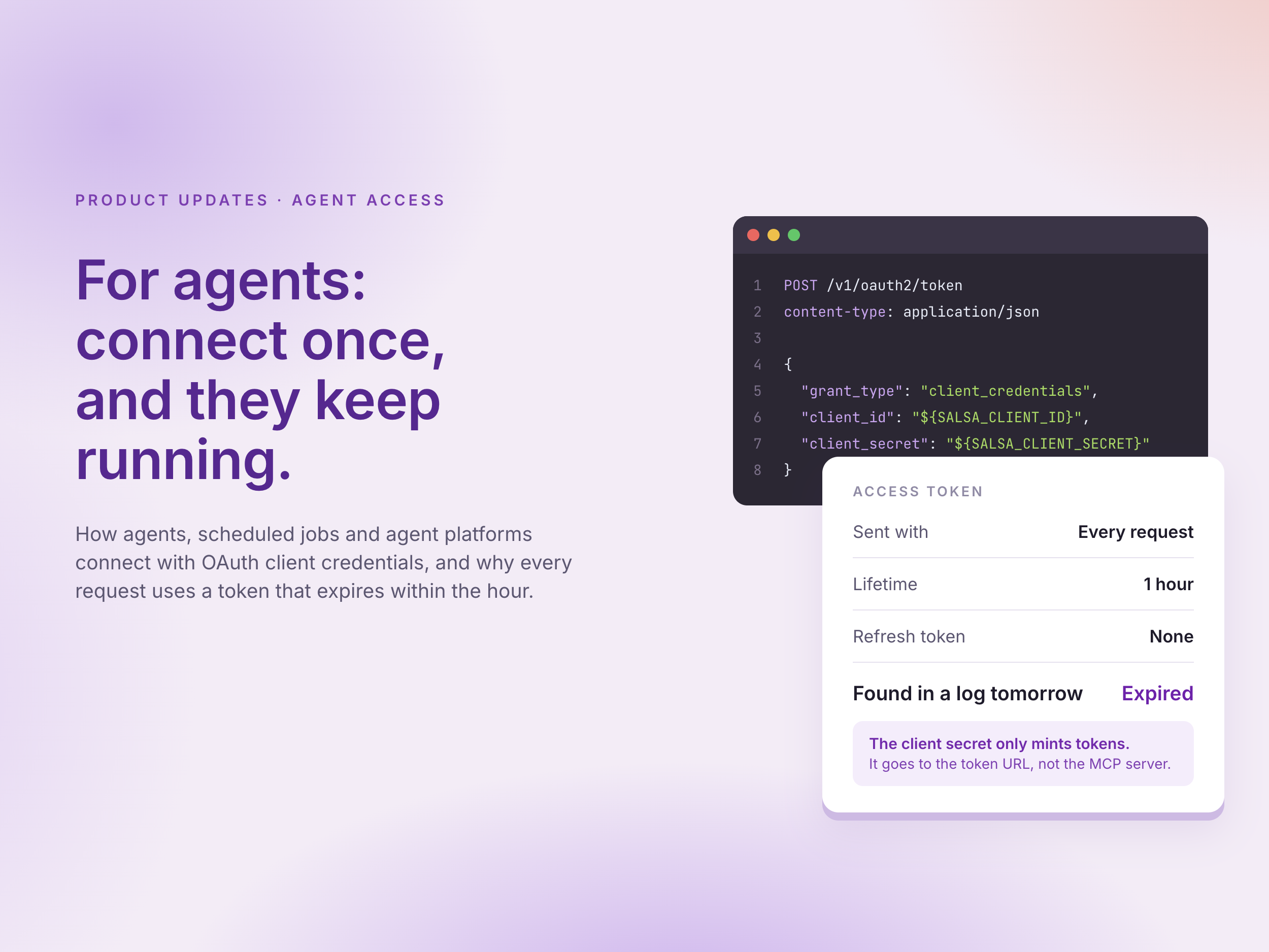
- OAuth client credentials are for agents, scheduled jobs, integrations and agent platforms that run without a person. They act as the OAuth client, with the access Salsa set when it provisioned that client. Each access token lasts one hour, with no refresh token.
- A user session is for a person connecting their own AI assistant. The assistant acts as that person, with their Salsa permissions, and the session renews with a refresh token while it's valid.
How client credentials work
1. Get a client. Ask your Salsa account team for an OAuth client with MCP access. Salsa provisions it and shares the client ID and secret.
2. Mint an access token. Your agent, or the platform running it, sends the client ID and secret to Salsa's token URL, which is the same for sandbox and production.
curl --request POST \
     --url https://api.stytch.salsa.dev/v1/oauth2/token \
     --header 'content-type: application/json' \
     --data '{
          "grant_type": "client_credentials",
          "client_id": "${SALSA_CLIENT_ID}",
          "client_secret": "${SALSA_CLIENT_SECRET}"
        }'
The response holds the token and how many seconds it's valid for.
{
  "access_token": "eyJhbGciOiJSUzI1NiIs...",
  "token_type": "bearer",
  "expires_in": 3600
}
3. Call the MCP server with the token. Every request to the MCP endpoint carries it.
Authorization: Bearer ${ACCESS_TOKEN}
4. Mint the next one before it expires. There's no refresh token, so use expires_in to request a new token shortly before the current one runs out. Reuse each token for its whole hour rather than minting one per call.
Agent platforms that support the OAuth 2.0 client credentials grant, such as n8n, handle steps 2 to 4 for you. You enter the token URL, client ID and secret once, and the platform gets new tokens on its own.
Why one-hour tokens
The client secret only mints tokens. It goes to one place, the token URL, and Salsa's MCP server doesn't accept it.
The access token is what every request carries, so it's the credential that passes through request logs, proxies, error trackers and agent traces. It expires within the hour. If one turns up in a log tomorrow, it no longer works.
The secret still needs protecting. Whoever has it can mint tokens. Keep it in a secrets manager or your platform's credential store, never in a chat or a prompt. If it might have been exposed, ask Salsa to disable the client or rotate its secret. No new tokens can be minted after that, and tokens already issued stop working within the hour.
Short-lived tokens are what the protocol recommends. The MCP authorization spec is built on OAuth 2.1 and says authorization servers "SHOULD issue short-lived access tokens to reduce the impact of leaked tokens". MCP has an official extension for client credentials, and GitHub Apps' one-hour installation tokens and AWS temporary credentials rest on the same idea.
Connect
The server uses the Streamable HTTP transport.
- Production: https://graphql-mcp.salsa.dev/mcp (read-write) and https://graphql-mcp.salsa.dev/mcp/readonly (read-only)
- Sandbox: https://graphql-mcp.sandbox.salsa.dev/mcp (read-write) and https://graphql-mcp.sandbox.salsa.dev/mcp/readonly (read-only)
Use a read-only URL unless the agent has to change data. Sending X-MCP-Readonly: true to the /mcp URL does the same. Read-only mode is on if either the URL or the header asks for it, and nothing can turn it off for that connection. The Salsa API enforces the same limit, so data can't change even if a tool call gets past the MCP server. If an agent needs both, give it two connections, such as salsa and salsa-readonly.
Setup steps for each client are in the MCP server docs, and the token flow is in the Authorization docs:
What an agent can call
Every client gets four base tools that work against Salsa's full GraphQL schema.
- search finds schema types that match search terms and returns their definitions.
- introspect explores the schema from a type, such as the root Query type.
- validate checks a GraphQL operation against the schema without running it.
- execute runs a GraphQL query. It rejects mutations, so it can't change data.
Salsa also provides pre-built tools for common jobs, such as finding an employer or worker, retrieving payroll details and generating reports. Some create, update or delete records. They're the only way the MCP server can change data, and read-only mode hides them. To see what's available, ask the agent "What Salsa tools do you have?"
Requests follow the same rate limits as the GraphQL API. One question can turn into several requests, so a long-running agent can reach the limit sooner than you'd expect.
For prompts to start from, see the prompt guide. New to the MCP server? Start with the launch post.
Before it touches production
- Run new agents against the sandbox URL first, and stay read-only unless the job has to change data.
- Watch what else the agent reads. Web pages, documents, email or other MCP servers can carry instructions written to manipulate it (prompt injection), so don't run Salsa next to tools you don't trust.
- Treat an agent's recommendation as a starting point, not a payroll, tax or legal determination.
- Know that data the agent reads from Salsa goes to your AI provider, under that provider's terms.
- Ask your account team to revoke clients you don't use.
If a request returns 401 Unauthorized, the access token has most likely expired, so mint a new one. If it keeps happening, the client may not have MCP access yet.
What's next
An API gives an agent access to payroll. Doing the job well also takes context about how payroll works, down to what each status means and what has to happen before a pay date. The MCP server and its prompt guide are a first step, and we're exploring how to give agents more of that context. If you're building agents that work with payroll, we'd like to work with you early. Tell us what you're building.
Stay in the know
Sign up to receive regular product updates highlighting our feature announcements and product enhancements.