
This month, we’re excited to roll out a few powerful updates designed to make your payroll product even more intuitive, transparent, and developer-friendly.
Introducing Salsa Sync for QuickBooks Online
We’ve officially launched Salsa Sync for QuickBooks, our native integration that brings payroll data seamlessly into QuickBooks Online. Once enabled, employers can connect their QuickBooks account, define how payroll maps to their chart of accounts, and control exactly when data is transmitted.
Payroll is the largest expense of most businesses, and having accurate, well‑mapped payroll data in their accounting system is essential. Every business structures its chart of accounts differently – especially when it comes to compensation and deductions – so offering flexible, fine‑tuned mapping is a must‑have.
This launch also solves what has traditionally been one of the biggest sources of payroll‑to‑bookkeeping errors: the tradeoff between automation and accuracy. Employers no longer need to choose between manual, time‑consuming reconciliation or shallow integrations that lack detail. With Salsa Sync, they get both – automated syncing with the precision of native‑level accounting workflows. That means fewer errors, faster month‑end closes, and more reliable books.
For partners, the impact is equally meaningful. QuickBooks is foundational to many employers’ tech stacks, and the absence of a strong integration has historically been a barrier to adoption. By delivering a deep, flexible, and production‑ready QuickBooks Online integration out of the box, we’re removing a blocker that improves conversion, expands total addressable market, and helps retain customers who would previously walk away due to accounting limitations. It’s an upgrade that creates real downstream value without requiring any product work from partners.
Salsa Sync for QuickBooks is now the most advanced QuickBooks Online integration available in the embedded payroll space – and it sets the groundwork for more integrations coming soon.

Consistent pay type ordering, everywhere
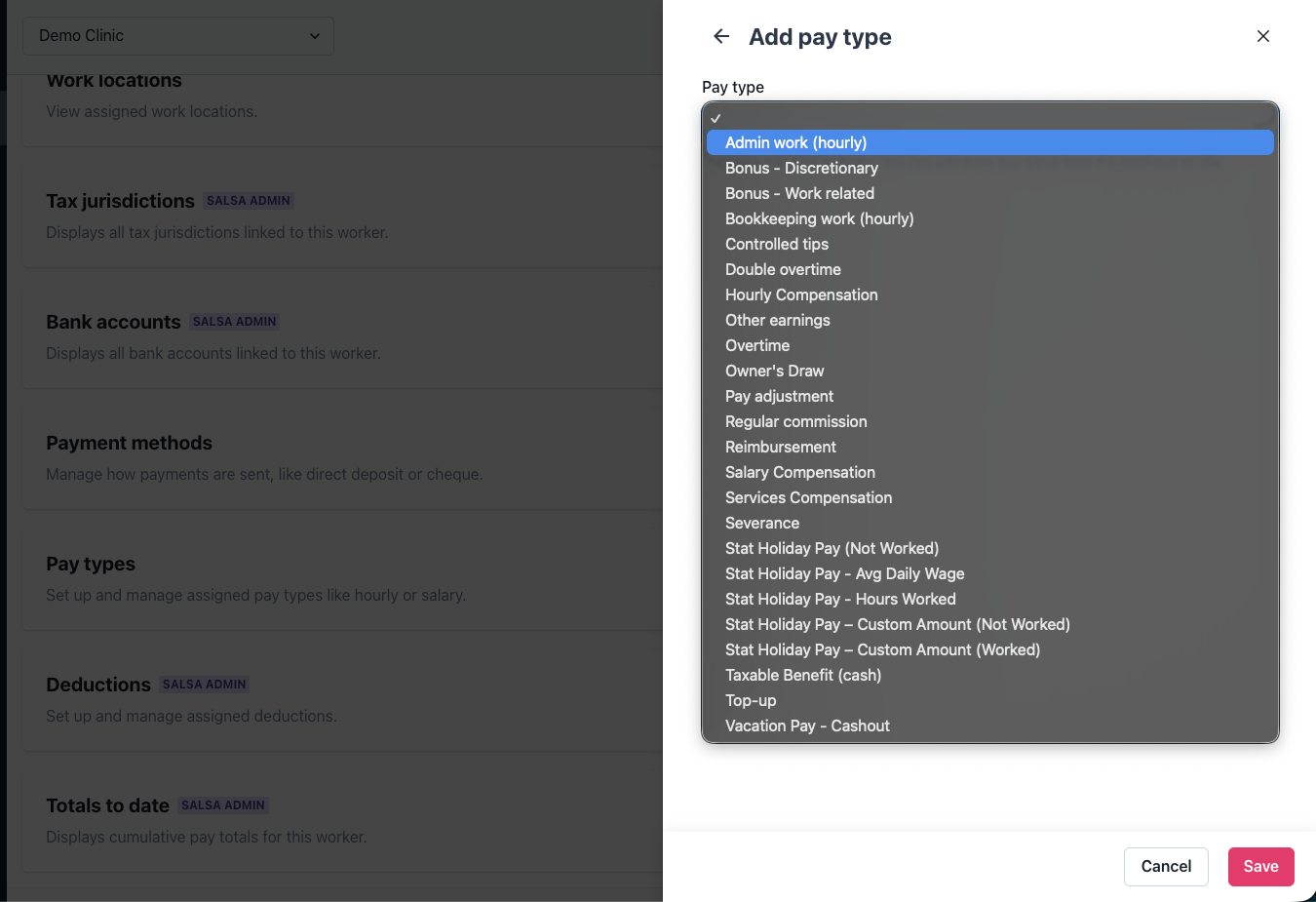
We’ve enhanced the consistency of how pay types appear across all product experiences. Pay type order has long been defined by the Salsa team for each partner, and this update ensures that every UI surface – including dropdowns – now follows that same defined order.
When no custom order is defined for a partner, we now apply a clear default: alphabetical ordering across all surfaces.
These improvements reduce cognitive load for employers and make the most important pay types easier to access – especially valuable in industries where workers may have multiple roles or earn different types of wages. By tightening these details, we help partners deliver a smoother, more intuitive experience while extending the value of our embeddable components.
More transparent payslip breakdowns
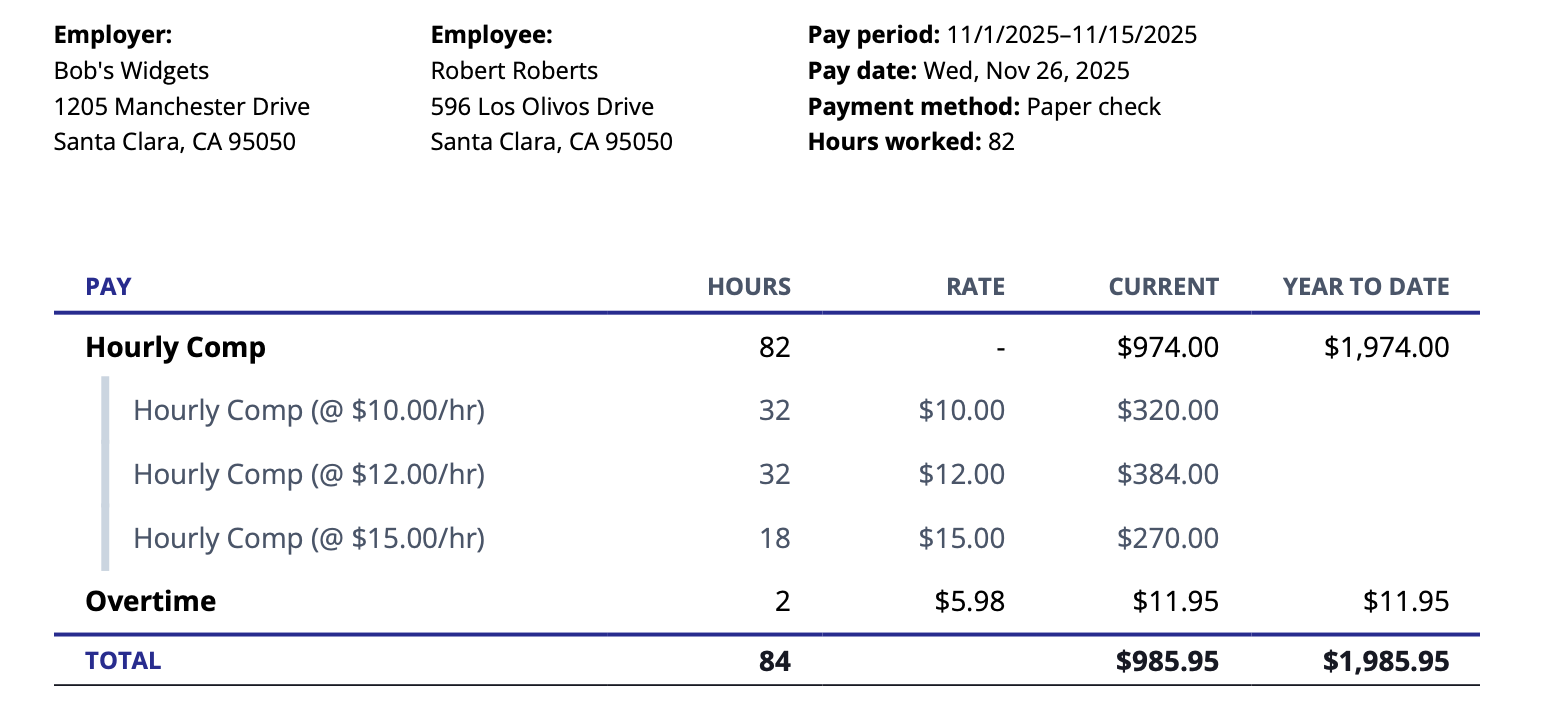
When employees work jobs with different rates, payslips now provide a detailed breakdown of the compensation that makes up the total pay for each pay type. This feature needs to be enabled, please reach out to your account manager to turn it on.
This level of granularity is especially expected in service industries and among employers with large, diverse workforces where workers often clock hours across roles, rates, or locations. Transparency isn’t just a nice-to-have; it’s a standard that builds trust, reduces support inquiries, and strengthens employee retention.
By offering this as part of the core experience, Salsa empowers partners to meet worker expectations, increase trust in their platform, and stay competitive with leading payroll providers. It’s one more way we help you elevate your payroll product and drive meaningful conversations with prospective customers.
Built to help you ship faster
Whether you're optimizing for clarity, consistency, or deeper integration, these updates are designed to help you ship faster and with confidence. If you're already building with Salsa, check out the docs for the latest. Curious about what embedded payroll can do for your platform? Let’s talk.
Stay in the know
Sign up to receive regular product updates highlighting our feature announcements and product enhancements.
.png)

.png)